
టెక్నాలజీ
కంప్యూటర్లో తెలుగు: విరిగిన ఫాంట్ల నుంచి యూనికోడ్, ఏఐ వరకు
ఒకప్పుడు తెలుగు అక్షరాలు డబ్బాలుగా, అర్థంకాని గుర్తులుగా ఎందుకు మారేవి, యూనికోడ్ దాన్ని ఎలా సరిచేసింది, ఈ రోజు సులువుగా తెలుగు టైప్ చేయడం ఎలా.
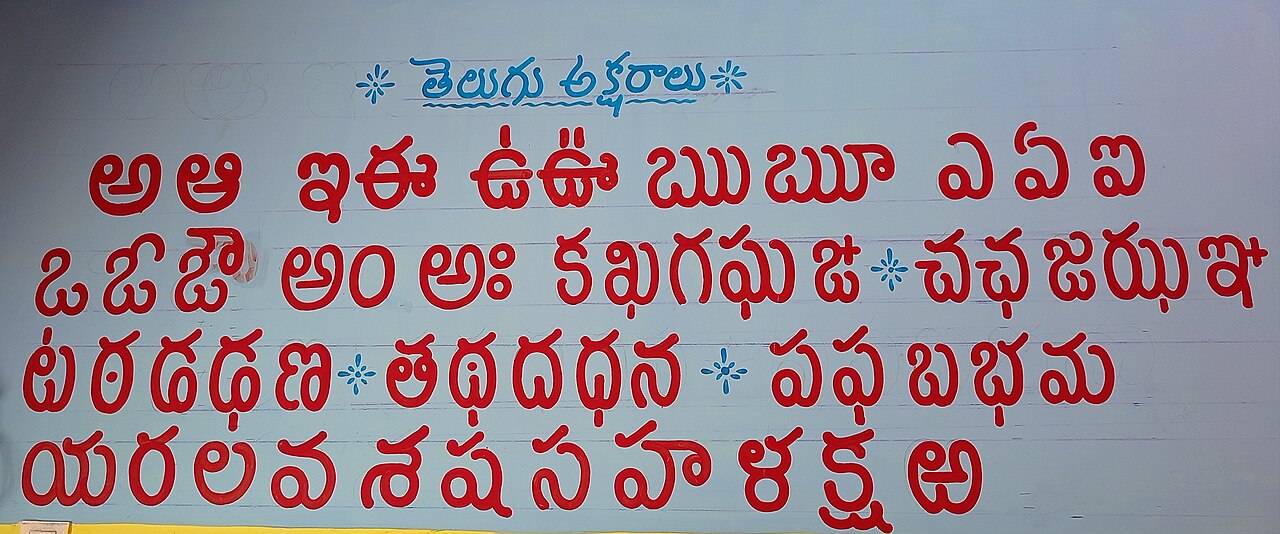
ఈ రోజు మీరు ఈ వ్యాసాన్ని ఫోన్లో, కంప్యూటర్లో సులువుగా తెలుగులో చదువుతున్నారు. వాట్సాప్లో తెలుగులో మెసేజ్ పంపుతున్నారు, గూగుల్లో తెలుగులో వెతుకుతున్నారు. కానీ ఇరవై ఏళ్ల క్రితం ఇది అంత సులువు కాదు. కంప్యూటర్లో తెలుగు ప్రయాణం ఆసక్తికరమైన కథ.
తెలుగు లిపి — కంప్యూటర్కు సవాలు
ఇంగ్లీష్లో 26 అక్షరాలు, ప్రతి అక్షరం విడిగా ఉంటుంది. కానీ తెలుగులో అచ్చులు, హల్లులు, గుణింతాలు, ఒత్తులు కలిసి ఒక్కో అక్షరం వేల రూపాల్లో కనిపిస్తుంది. "క్ష్మ్య" వంటి సంయుక్తాక్షరాలను సరిగ్గా చూపించడం కంప్యూటర్కు కష్టమైన పని. అందుకే తొలి కంప్యూటర్లు భారతీయ భాషలను చూపించడంలో ఇబ్బంది పడ్డాయి.
ఫాంట్ల గందరగోళం యుగం
1990ల్లో, 2000ల ప్రారంభంలో తెలుగు పత్రికలు, ప్రచురణ సంస్థలు తమ సొంత ఫాంట్లను తయారుచేసుకున్నాయి. ఈ ఫాంట్లు ఇంగ్లీష్ అక్షరాల స్థానంలో తెలుగు ఆకారాలను పెట్టేవి. సమస్య ఏమిటంటే — ఒక పత్రిక ఫాంట్లో రాసిన పత్రాన్ని ఆ ఫాంట్ లేని కంప్యూటర్లో తెరిస్తే, అర్థంకాని ఇంగ్లీష్ అక్షరాలు, గుర్తులు కనిపించేవి. వెబ్సైట్లు చదవాలంటే ముందు ఆ సైట్ ఫాంట్ డౌన్లోడ్ చేసుకోవాలి. ఇంటర్నెట్లో తెలుగులో వెతకడం దాదాపు అసాధ్యం. చాలామంది "తెంగ్లీష్" — ఇంగ్లీష్ అక్షరాల్లో తెలుగు — రాసేవారు.
యూనికోడ్ — అందరికీ ఒకే భాష
ఈ సమస్యకు పరిష్కారం "యూనికోడ్". ప్రపంచంలోని ప్రతి భాషలోని ప్రతి అక్షరానికి ఒక ప్రత్యేక సంఖ్య (కోడ్) ఇచ్చే అంతర్జాతీయ ప్రమాణం ఇది. తెలుగు అక్షరాలకు యూనికోడ్లో ప్రత్యేక విభాగం కేటాయించారు. దీంతో ఏ కంప్యూటర్లో, ఏ ఫోన్లో అయినా "అ" అంటే "అ"గానే కనిపిస్తుంది. ఫాంట్ మారినా అక్షరం మారదు.
అయితే యూనికోడ్ రావడంతోనే సమస్య తీరలేదు. ఆపరేటింగ్ సిస్టమ్లు సంయుక్తాక్షరాలను సరిగ్గా అమర్చే "రెండరింగ్" వ్యవస్థను తెలుగుకు సపోర్ట్ చేయాలి. మైక్రోసాఫ్ట్ విండోస్లో "గౌతమి" వంటి యూనికోడ్ తెలుగు ఫాంట్ రావడం, లినక్స్లో "పోతన", "వేమన" వంటి ఉచిత ఫాంట్లను స్వచ్ఛంద సేవకులు తయారుచేయడం ఈ ప్రయాణంలో ముఖ్య మైలురాళ్లు.
స్వచ్ఛంద సేవకుల పాత్ర
తెలుగు కంప్యూటింగ్ అభివృద్ధిలో ప్రభుత్వాలు, కంపెనీలతో పాటు ఎంతోమంది స్వచ్ఛంద సేవకుల కృషి ఉంది. ఉచిత ఫాంట్లు, ఇంగ్లీష్ కీబోర్డ్తో తెలుగు టైప్ చేసే "లేఖిని" వంటి ఆన్లైన్ టూల్స్, తెలుగు వికీపీడియా, తెలుగు బ్లాగుల ఉద్యమం — ఇవన్నీ ఇంటర్నెట్లో తెలుగు కంటెంట్ను పెంచాయి.
స్మార్ట్ఫోన్ విప్లవం
ఆండ్రాయిడ్ ఫోన్లు తెలుగును పూర్తిగా సపోర్ట్ చేయడం మొదలుపెట్టాక పరిస్థితి పూర్తిగా మారింది. గూగుల్ ఇండిక్ కీబోర్డ్, జీబోర్డ్లో తెలుగు లేఅవుట్, వాయిస్ టైపింగ్ — ఇప్పుడు చదువుకోని వారు కూడా మాట్లాడితే చాలు, ఫోన్ తెలుగులో రాస్తుంది. తెలుగు యూట్యూబ్, తెలుగు వార్తా వెబ్సైట్లు, తెలుగు యాప్లు వేగంగా పెరిగాయి.
ఈ రోజు తెలుగు టైప్ చేయడం ఎలా?
• ఫోన్లో: జీబోర్డ్ లేదా మీ కీబోర్డ్ యాప్ సెట్టింగ్స్లో "తెలుగు" భాష జోడించండి. "ట్రాన్స్లిటరేషన్" మోడ్లో "namaskaram" అని టైప్ చేస్తే "నమస్కారం" వస్తుంది. లేదా మైక్ నొక్కి మాట్లాడండి.
• కంప్యూటర్లో (విండోస్): సెట్టింగ్స్లో భాషలు విభాగంలో తెలుగు కీబోర్డ్ జోడించండి. గూగుల్ ఇన్పుట్ టూల్స్ వంటి ట్రాన్స్లిటరేషన్ పద్ధతులు కూడా అందుబాటులో ఉన్నాయి.
• పాత ఫాంట్ పత్రాలు: పాత నాన్-యూనికోడ్ ఫాంట్లలో ఉన్న పత్రాలను యూనికోడ్కు మార్చే కన్వర్టర్ టూల్స్ ఉన్నాయి.
ఏఐ యుగంలో తెలుగు
ఇప్పుడు కృత్రిమ మేధ (ఏఐ) చాట్బాట్లు తెలుగులో మాట్లాడుతున్నాయి, అనువాదం చేస్తున్నాయి, తెలుగు చేతిరాతను చదువుతున్నాయి. అయితే ఇంగ్లీష్తో పోలిస్తే ఇంటర్నెట్లో తెలుగు కంటెంట్ తక్కువ కాబట్టి, ఏఐ తెలుగులో ఇంకా తప్పులు చేస్తుంది. ఎంత ఎక్కువ నాణ్యమైన తెలుగు కంటెంట్ ఇంటర్నెట్లో ఉంటే, ఏఐ అంత మంచి తెలుగు నేర్చుకుంటుంది.
ముగింపు
భాష బతకాలంటే అది కొత్త సాంకేతికతలో కూడా బతకాలి. డబ్బాలుగా కనిపించిన తెలుగు అక్షరాలు ఈ రోజు ఏఐతో మాట్లాడుతున్నాయి. మీరు ఇంటర్నెట్లో తెలుగులో రాసే ప్రతి వాక్యం ఆ భాష భవిష్యత్తుకు పెట్టుబడి.
ఫోటో: K.Venkataramana / Wikimedia Commons (CC BY-SA 4.0)
Telugu on computers: From broken fonts to Unicode and AI
Today you are easily reading this article in Telugu on your phone or computer. You are sending messages in Telugu on WhatsApp, searching in Telugu on Google. But twenty years ago it was not that easy. The journey of Telugu on a computer is an interesting story.
Telugu script — a challenge for computers
English has 26 letters, each letter is separate. But in Telugu, each letter appears in thousands of forms, with vowels, consonants, multiples, and accents. It is difficult for a computer to correctly display compound letters like "Ksmya". That is why early computers had difficulty displaying Indian languages.
The era of font confusion
In the 1990s and early 2000s, Telugu newspapers and publishing houses developed their own fonts. These fonts replaced English letters with Telugu shapes. The problem was — if a document written in a newspaper font was opened on a computer that did not have that font, it would display incomprehensible English letters and symbols. To read websites, you had to download the site's font first. Searching in Telugu on the Internet was almost impossible. Many people wrote "Tenglish" — Telugu in English letters.
Unicode — One language for all
The solution to this problem is "Unicode". This is an international standard that gives a unique number (code) to each letter in every language in the world. A separate section has been allocated for Telugu letters in Unicode. With this, "A" will appear as "A" on any computer or phone. Even if the font changes, the letter does not change.
However, the problem did not end with the arrival of Unicode. Operating systems must support Telugu with a "rendering" system that correctly arranges the combined letters. The arrival of Unicode Telugu fonts like "Gautami" in Microsoft Windows, and the creation of free fonts like "Pothana" and "Vemana" in Linux by volunteers are important milestones in this journey.
The role of volunteers
The development of Telugu computing has been driven by the efforts of governments, companies, and many volunteers. Free fonts, online tools like "Lekhini" for typing Telugu with an English keyboard, Telugu Wikipedia, and the Telugu blog movement — all of these have increased the amount of Telugu content on the internet.
The smartphone revolution
The situation has completely changed since Android phones started supporting Telugu. Google Indic keyboard, Telugu layout on Gboard, voice typing — now even uneducated people just need to speak, and the phone will type in Telugu. Telugu YouTube, Telugu news websites, and Telugu apps have grown rapidly.
How to type Telugu today?
• On phone: Add the "Telugu" language in Gboard or your keyboard app settings. In "Transliteration" mode, type "namaskaram" to get "Namaskaram". Or tap the mic and speak.
• On a computer (Windows): Add the Telugu keyboard in the Languages section of Settings. Transliteration methods such as Google Input Tools are also available.
• Old font documents: There are converter tools that convert documents in old non-Unicode fonts to Unicode.
Telugu in the AI era
Now, artificial intelligence (AI) chatbots are speaking, translating, and reading Telugu handwriting in Telugu. However, since there is less Telugu content on the internet compared to English, AI still makes mistakes in Telugu. The more quality Telugu content there is on the internet, the better the AI learns Telugu.
Conclusion
For a language to survive, it must survive in new technology. Telugu letters that once appeared as boxes are now talking to AI. Every sentence you write in Telugu on the internet is an investment in the future of that language.
Photo: K.Venkataramana / Wikimedia Commons (CC BY-SA 4.0)